Every solopreneur eventually hits the same digital wall. You find the perfect software to manage your projects, and another perfect tool to handle your billing, but they refuse to talk to each other. This lack of native integration forces you back into the tedious habit of manual copy-pasting.
However, you do not need to hire a developer to build a custom bridge. Learning how to connect apps without code is entirely possible once you understand the underlying language of the internet. By grasping a few foundational concepts, you can force almost any modern software to share information seamlessly.
This guide breaks down the technical jargon into plain English, explaining how data moves behind the scenes so you can build a truly connected business.
What is an API?
To understand how software communicates, we must define the primary mechanism.
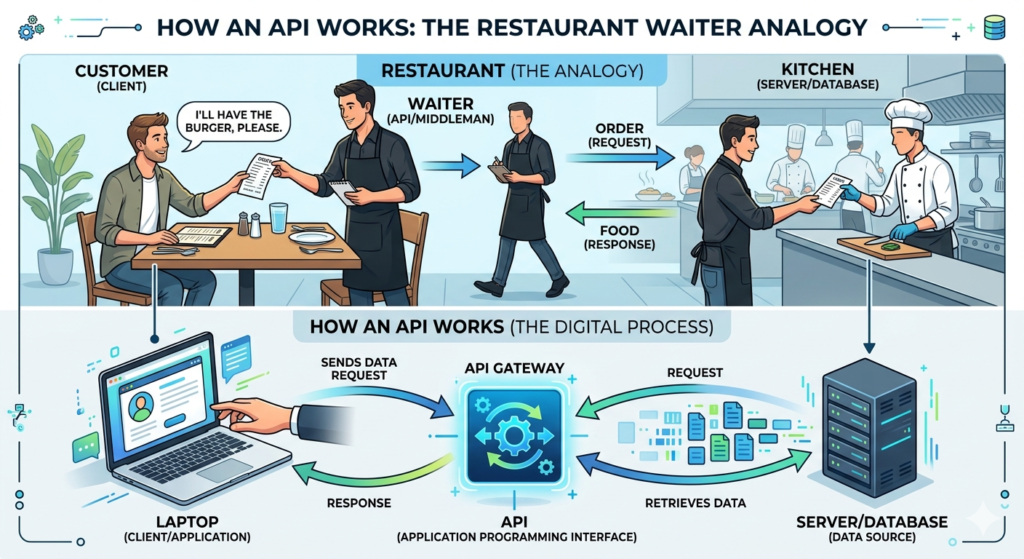
An API (Application Programming Interface) is a set of rules that allows one software application to communicate with another. It acts as a digital messenger, taking a request from one system, delivering it to another, and returning the exact data requested.
Think of an API like a waiter in a restaurant. You (the user) sit at the table with a menu. The kitchen (the database) has the food. You cannot go into the kitchen yourself to get the ingredients. Instead, you give your order to the waiter (the API), who takes it to the kitchen and brings your prepared food back to the table.
API Integration for Beginners
For a long time, using APIs required writing complex lines of programming code. Today, the landscape is much more accessible. Api integration for beginners relies on visual platforms that handle the raw code in the background.
You simply provide the software’s API “Key” (a digital passcode generated in your account settings) to authenticate your access. Once authenticated, visual automation tools allow you to map data fields together. For example, you can visually drag the “Email Address” field from your form software directly into the “Subscriber” field of your newsletter platform.
To understand how these visual connectors fit into your broader business architecture, read our comprehensive guide on The Perfect No-Code Tech Stack for Solopreneurs.
Understanding JSON for Non-Coders
When two applications talk to each other through an API, they need a shared language to ensure the data is understood correctly. The most common language on the modern web is JSON (JavaScript Object Notation).
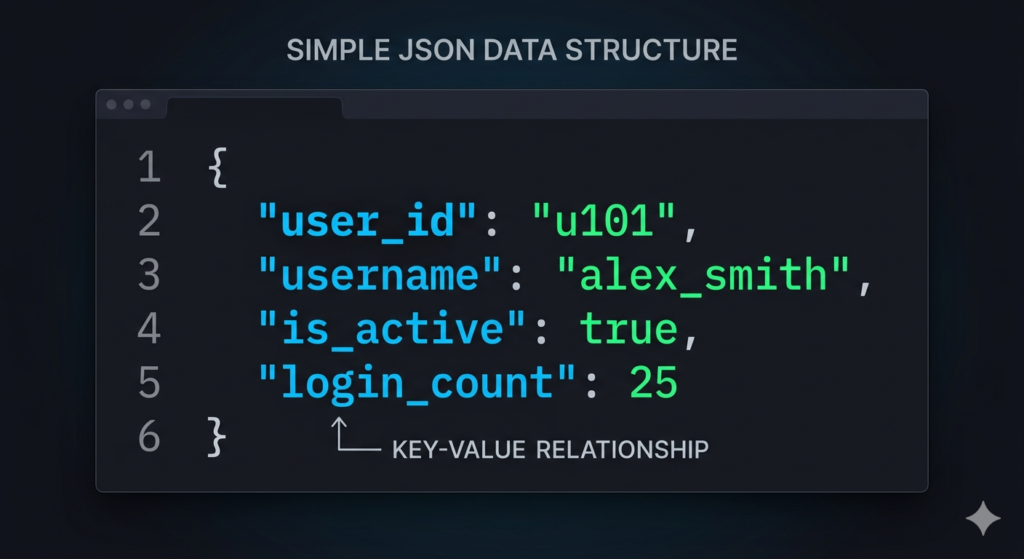
While the acronym sounds intimidating, json for non-coders is highly logical. It is simply a way to format data using “Key/Value” pairs. Imagine a digital form. The “Key” is the static label (e.g., “First Name”), and the “Value” is the specific data (e.g., “John”).
By structuring data strictly as "First Name": "John", any software can easily read, categorize, and store incoming information without confusion.
Webhook Tutorial: The Instant API
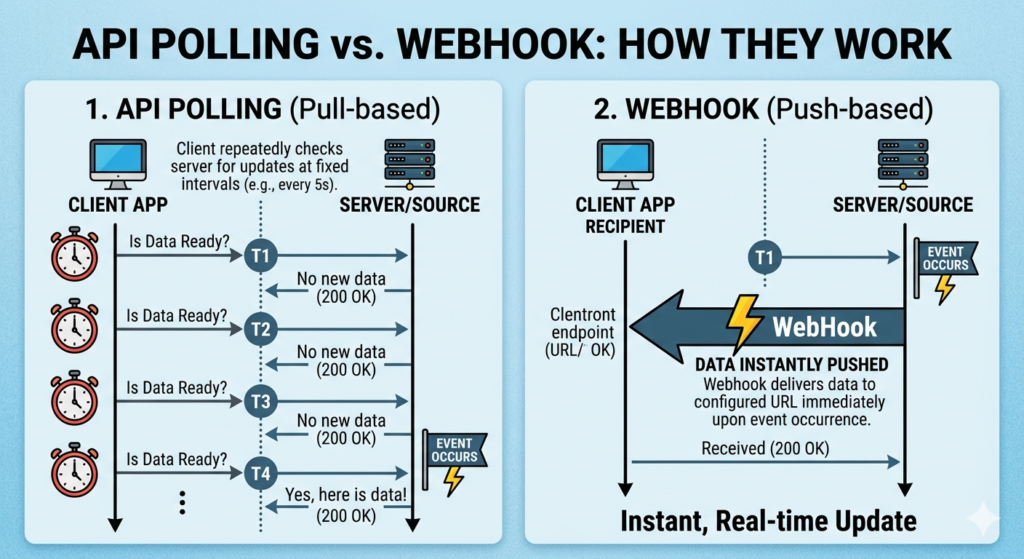
While standard APIs are fantastic for retrieving data, they usually require your system to ask for the data first—a process called “polling.” If you want an instant reaction, you need a Webhook.
Think of this basic webhook tutorial as the difference between checking your mailbox and getting a text message delivery alert. With a standard API, your system asks, “Is there new data?” every five minutes. With a webhook, your system simply waits in silence.
The moment an event occurs (like a client paying a bill), the originating software instantly “pushes” the data package to a specific, unique web address. This makes webhooks incredibly fast and efficient for trigger-based automations.
Testing and Catching Data
Setting up custom integrations requires a safe place to test how the data is formatted. You need to see exactly what the “payload” looks like before you connect it to your live database to prevent messy errors.
To inspect these data requests, you need a designated testing environment. Using a tool like Postman or Zapier Webhooks allows you to generate a temporary URL to “catch” the data safely.
You can trigger a test event in your software, catch the resulting JSON code in your testing tool, and review it. This ensures all the necessary client details are present and formatted correctly before you finalize the live connection.
Conclusion
You do not need a computer science degree to build a highly automated business. By grasping these foundational concepts, you empower yourself to connect apps without code securely and efficiently. Understanding how APIs pass information, how JSON formats the data clearly, and how webhooks trigger instant actions turns the internet into a customizable toolkit. You can build the exact operational pipeline your business needs, regardless of native limitations.
Frequently Asked Questions (FAQ)
What happens if an API key is compromised?
An API key is essentially a master password for your software account. If someone else gets access to it, they can read your data or make changes on your behalf. If you suspect a key is compromised, you should immediately log into the software, delete the old key, and generate a new one.
Are webhooks better than APIs?
Neither is inherently “better”; they serve different purposes. Webhooks are better for instant, one-way notifications (e.g., “Send an email the second a payment clears”). APIs are better for complex, two-way interactions (e.g., “Search the database for this specific client and return their history”).
Do all software applications have APIs?
Most modern, cloud-based software (SaaS) platforms have public APIs. However, some legacy systems or highly secure enterprise applications may restrict API access or require you to pay for a premium subscription tier to use it.
Can I break my software by using APIs incorrectly?
While you generally will not “break” the software itself, an incorrect API setup can create a massive mess in your database. For example, if you map the JSON values incorrectly, you could accidentally overwrite hundreds of client names with blank spaces. Always use a testing environment before pushing an integration live.