The traditional to-do list is broken. Most solopreneurs write down twenty tasks in the morning, only find the time to complete five, and end the workday feeling defeated. Balancing deep creative work, client meetings, and tedious administrative duties often requires an exhausting level of manual scheduling.
When you spend thirty minutes every morning just trying to figure out what you should be working on, you are wasting your most valuable, high-energy hours on logistics rather than execution.
To reclaim your focus, you must shift the burden of planning to technology. This guide will show you exactly how to use AI for productivity, allowing intelligent software to manage your calendar, protect your energy, and ensure your most critical deadlines are always met.
What is AI Productivity Planning?
Before integrating these tools into your workflow, it is important to understand how they differ from a standard digital calendar.
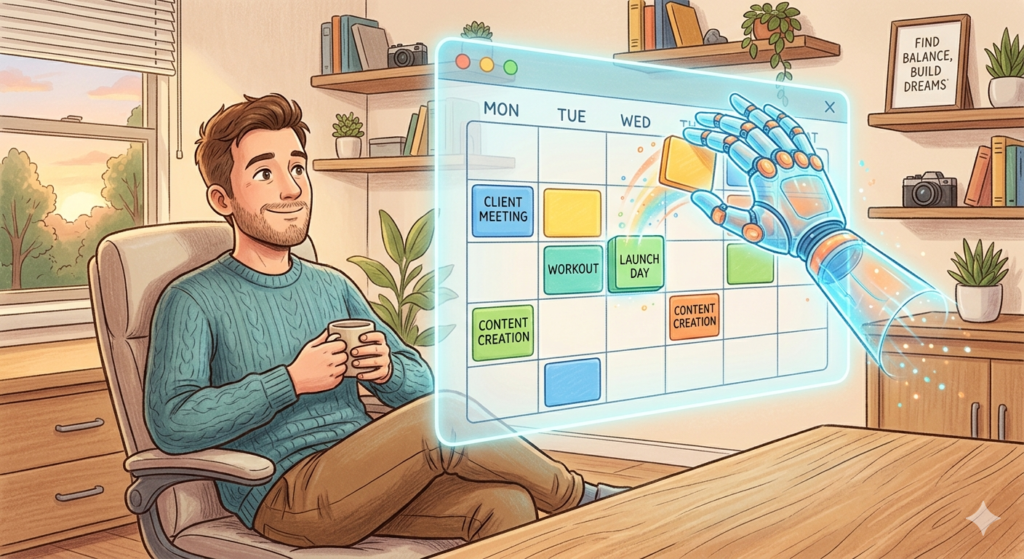
To know how to use AI for productivity means leveraging intelligent software to automatically organize your daily schedule. Instead of manually slotting tasks into a calendar, artificial intelligence analyzes your deadlines, meeting load, and energy levels to build an optimized, dynamic plan for the day.
It acts as an executive assistant that constantly monitors your workload, adjusting your schedule in real-time as new priorities emerge.
The Problem with Manual Time Blocking
Productivity experts have long recommended the practice of time blocking—allocating specific chunks of time on your calendar for specific tasks. While the theory is sound, manual execution is incredibly fragile.
The fatal flaw of manual scheduling is that life happens. A client call goes twenty minutes long, or an urgent email demands immediate attention. Suddenly, your perfectly crafted schedule shatters. You are then forced to manually drag and drop every subsequent block of time to recalculate the rest of your week.
This creates a massive administrative burden, punishing you for the natural unpredictability of running a business.
Upgrading to an AI Schedule Maker
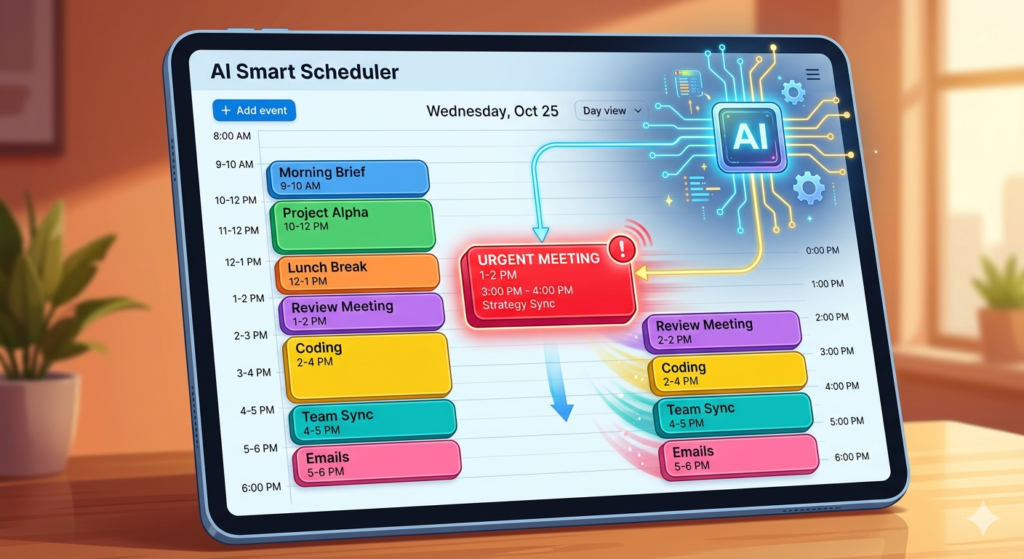
This is where artificial intelligence fundamentally changes the game. An ai schedule maker treats your calendar not as a static wall, but as a fluid puzzle.
If an emergency pops up and you miss a scheduled block of deep work, the AI instantly recalculates. It evaluates the remaining hours in your week, identifies which tasks can safely be delayed, and automatically shuffles your schedule to accommodate the disruption while keeping your strict deadlines intact.
Dedicated platforms designed for this exact purpose, such as Motion or Reclaim.ai, connect directly to your task list and your meeting software. They proactively defend your deep work time by physically blocking it off so clients cannot book over it, ensuring your day remains balanced.
Prioritizing Tasks by Energy, Not Just Deadlines
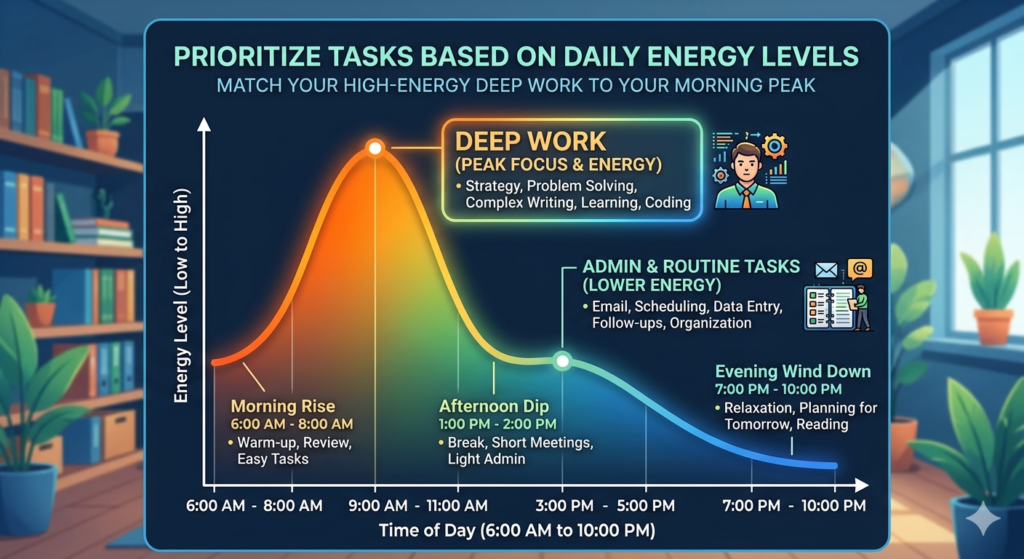
A critical element of sustainable productivity is energy management. You cannot execute deep, creative problem-solving at 4:00 PM after enduring three hours of back-to-back Zoom calls.
When setting up your AI planner, you can tag individual to-dos by duration, priority, and required focus level. Prioritizing tasks then becomes an automated process. The software schedules your high-focus, difficult work for your peak morning hours, and automatically pushes low-energy administrative tasks to the afternoon slump.
This energy management pairs perfectly with a strong intellectual foundation. If you want to speed up your output during these highly focused morning blocks, you need a pre-organized system to hold your ideas, which you can learn to build in our guide: Building a Second Brain: A Guide for Creators.
Mastering Time Blocking with AI
When you begin time blocking with AI, you eliminate the cognitive friction of deciding what to do next.
You simply sit down at your desk, open your calendar, and the software tells you exactly what to execute right now to stay on track. If you finish a task early, the AI pulls the next task forward. If you take a sick day, the AI rebuilds the entire week’s plan while you rest.
This level of automation removes the guilt and stress of falling behind, replacing it with a realistic, mathematically optimized path forward.
Conclusion
The secret to maximizing your output without burning out is learning how to use AI for productivity. By abandoning rigid manual planners and embracing intelligent software, you allow technology to manage the logistics of your day. An automated calendar protects your energy, adapts to chaos instantly, and ensures you spend your time actually doing the work, rather than just planning to do it.
Frequently Asked Questions (FAQ)
Is an AI schedule maker difficult to set up?
The initial setup takes about 30 to 60 minutes. You need to connect your existing digital calendars, input your standard working hours, and define your task categories (e.g., “Deep Work,” “Admin,” “Meetings”). Once the parameters are set, the daily maintenance is minimal.
What happens if I ignore the AI’s schedule for the day?
If you skip a scheduled task or decide to work on something else, the AI will not break. It will simply recognize that the task was not marked as “Complete” by the scheduled end time and automatically reschedule it for the next available slot before the deadline.
Can AI schedule makers integrate with Google Calendar or Outlook?
Yes. Almost all AI scheduling tools function as an overlay to your existing Google Workspace or Microsoft 365 calendar. They read your existing appointments, add their own scheduled task blocks, and sync everything bi-directionally so you can still view your schedule on your phone’s native calendar app.
Will AI automatically schedule meetings with clients for me?
Yes, most AI planners include a booking link feature (similar to Calendly). However, the AI takes it a step further by offering clients meeting times that actively protect your preferred deep work blocks, rather than just showing them every single blank space on your calendar.